I stay away from Apple predictions, because I find that I’m usually wrong, but often surprised (in a good way) by the company, and I enjoy that.
Which makes this impending iPhone announcement a little less exciting for me as all of the leaked photos of the phone’s components have pretty much revealed most everything new about the phone. While we won’t know anything until they actually announce it, here’s what is expected:
- The phone will have a larger screen in height, giving it more of a 16:9 aspect ratio, but no additional width.
- The phone will be slightly taller and thinner.
- The phone will have a new dock connector.
- It will be called the iPhone 5.
 This last one about the naming of the new iPhone was only confirmed by the recent invitation to the event next week which has the number 5 as a prominent part of the graphic. I had been leaning towards Apple dropping the number from the phone name, as they have recently done with the iPad. This made some sense to me as they don’t number their computer or iPods in this way, and I thought that they would be aligning all of their products this way. But they perhaps have a good reason for this as pointed out by Jeremy Herrman (via DF).
This may also lend credence to the rumor that Apple will announce it’s new 7″ iPad at a separate event in October. This is not certain, but certainly seems likely. I was bit disappointed when I first heard speculation that the smaller, rumored iPad would not be announced at the same time as the new phone, because I like an Apple keynote that is full of goodies. But I understand the arguments, and it’s better now that that news is out of the bag instead of a boatload of investors driving the stock down after they’re disappointed that the smaller iPad isn’t announced along with the new phone. (Imagine the stock price if they announce it now anyway!)
The problem I have with a keynote devoted entirely to the iPhone is the repetition we’re sure to endure. If Apple stays true to their template of last year, once they get through updating their sales and share numbers (always fun), reveal the new phone and discuss the hardware, then we will move into the software. Last year this section of the keynote from Scott Forstall was almost identical to the software presentations he gave during the World Wide Developers Conference (WWDC) only a few months before. I am wondering if we will see the same thing at this year’s keynote to fill the time if they intend to focus primarily on the iPhone. I understand that the WWDC is aimed at developers, and that this iPhone keynote is aimed at consumers, but the reality is that most people and journalists who are going to watch this keynote online already geeked out to the WWDC iOS 6 keynote, so they will be covering old ground here.
Other items in the rumor mill for imminent announcements over the next couple of months are new iMacs, which might be entirely possible, a new retina MacBook Air, which I doubt as the current model is still too new, and I’m not sure the battery is there yet to support the processing needed to drive all of the additional pixels. New iPods are a possibility, and the 7″ iPad seems almost assured, although it seems we will have to wait until October for that.
Since I have veered into the prediction arena a bit here, I do have one prediction for the new iPhone which I have not seen anybody else write about. I predict the new iPhone will support faster syncing over USB 3.
Alright, that’s all I’ve got.
Tags: Apple, iPad, iPhone
 I constantly receive unsolicited invitations by people I have never met asking me to join their Linked In network. Usually these are from people in the same field of work as me who are looking to expand their network, or they work in sales for some company that I may or may not do business with.
Linked In is a professional network, or rather a networking tool used by professionals and businesses. It is not Facebook. My Linked In network consists of people whom I have personally worked with over the years and feel fairly well acquainted with their skills and personalities. I would vouch for any person in my network if asked, because I can speak knowledgeably about them and their abilities. I do not include people in my network who I may know well but do not respect their work ethic, or who may be quite good at what they do, but are difficult to work with.
So it baffles me when I receive these invitations from people I don’t know, and who don’t know me. I’m not saying that these are unqualified people, but I don’t know that. I have a co-worker who gets many of the same invitations as I do, and he often accepts them. I asked him why, and he says it’s because it helps expand his network. My response is “Yes, but what if they’re a dick?”
Currently I have a full time job that keeps me plenty busy, so I am not looking to pick up freelance work, or for new employment. I understand where having an expanding network could be helpful in this situation. But then, if I’m getting recommended by someone in the network, I want to know that I can trust them, and that they can trust who they’re making the recommendation to. It’s great to have a professional network, but if you let every person into your network, how do control the quality of that network? If you dilute your network with people who are mediocre in their field, does that not reflect poorly on you?
Here is my short response for anyone who is looking to add me to their “professional network.”
If I do not know you, do not ask me to be a part of your network. I choose to have people in my network who I know and respect through personal experience, and who I would not hesitate to recommend as a resource. To become a part of my network I must have worked with you on at least two occasions, or one major event, and then I must come away from that experience with a sense of your professionalism and capabilities. If I don’t know you, don’t waste your time.
Tags: Networking
Now, overall I’m a fan of Mayor Bloomberg. I admire him because his loyalties are not to the left or right, but to common sense. I can’t say that I am as vehemently opposed to this drink ban as many others, though I do understand where their criticism is coming from, even if I do believe it’s a little overblown.
But if nothing else, Bloomberg has brought attention to the ridiculous portion sizes of the drinks being served in restaurants, cafes, movie theaters, and sporting & event arenas. The standard size of soft drink portions that these public venues serve has grown considerably over the past decades. Even my kids are surprised by the size when they order a medium drink at a fast food restaurant.
Honestly, it is truly ridiculous how large the serving sizes have become, with one of the most extreme being the 7-Eleven Team Gulp at 128 oz. That’s just crazy. Would you buy a 2 liter bottle of soda and stick a straw in it? How about two, because that’s just about what you would be doing with this team gulp.
Indeed, the gas station/convenient stores seem to be the worst offenders, but McDonald’s, Wendy’s & Burger King all offer a 42 oz drink size. That’s over 5 cups of liquid – go ahead, take a look at that measuring cup you have in the cabinet. KFC is apparently the worst offender with a 64 oz drink, a full half gallon.
Even coffee shops are not immune to this, with Starbucks increasing their sizes from the original 12 oz large – now called the Tall, and their default “small” size – to a 31 oz Trenta. That’s the equivalent to going into a diner and ordering four cups of coffee.
Bloomberg does have a point about portion sizes, and he see’s where his city’s money is going – health care for the obese. And he does have an epidemic on his hands as unhealthy, overweight individuals tax health services and use more sick time.
Of course the companies serving up these extra large drinks, with names such as HuMUGous, The Beast, and Mega, claim that their customers are perfectly capable of making intelligent decisions when it comes to these choices. You would think so. But how often have you heard, after making your choice, a friendly cashier ask if you’d like to get the next larger portion for only 50 cents more? Apparently, even if we do make a choice that’s best for us, it’s not good enough for these retailers.
So while Bloomberg’s concern about the drink sizes in his city, and the nation, are valid I think that perhaps he is going about it the problem the wrong way. The large sizes should not be banned. If you want to be a glutton, go for it. What Bloomberg should instate is a mandatory sizing for reasonable drinks, whereby all venues serve a Small at 8 oz, Medium at 12 oz, and Large at 16 oz. After that the vendor can create any size they want and call it what they want. I even have a few suggestions:
-
20 oz – Xtra Large
-
24 oz – Super Size
-
32 oz – Double Portion
-
64 oz – Slosh-buckler
-
128 oz – Elephantine
-
256 oz – Water-Boarder
From an article on today’s AppleInsider.com:
“Samsung’s first Galaxy S was known as the Samsung Fascinate at Verizon, the Captivate on AT&T, the Epic 4G on Sprint, and the Vibrant with T-Mobile. Similarly, the Galaxy S II was branded as the Skyrocket at AT&T, the Epic 4G Touch at Sprint, and the Titanium at T-Mobile.
That plethora of names may have made the branding too confusing for consumers.”
You think?
Tags: Android, iPhone, Samsung
 We had a very full Easter weekend this past week. We started with dying eggs on Saturday afternoon, then dinner and a movie with the kids and Susan’s youngest sister and her fiancé. The kids slept in a bit on Sunday (Easter tends to not have the same build up as Christmas), but once they were up, enjoyed searching for the eggs that the bunny had hidden.
 Once all of the eggs were accounted for, we began getting everyone ready for our day – rotating through the showers and getting snacks for the kids – before driving up to Menomonee Falls to meet up with our Brother-in-law and his family for brunch at his golf club.This was a great three hour meal with a large buffet and 30 of us in a more-or-less private room away from the main dining area. The boys were heading back for seconds before I even sat down with my first plate of food.
After brunch we all headed over to our brother-in-law’s father’s house where the kids and their cousins had another Easter egg hunt. We stayed there for the rest of the day relaxing with a few beers and watching the kids enjoy themselves before finally heading home.
All in all, a full holiday weekend, but not too stressful and no drama. A good holiday. I’ve posted some pictures from the day on the Photos page.
Tags: Easter, Eggs, Holiday
I picked up my first iPad just over a week ago with the release of the New iPad. That was a Friday, and Monday I was flying to Istanbul. I spent a little time using the new toy over the weekend before traveling, but there was plenty to do with family and preparing for my trip, so not a lot of time to play.
Now that I’ve been on site for a week, the iPad has changed the way I work when managing these events. I always travel with a binder to hold timelines, drawings, gear lists, etc. I had converted all of these documents to PDF files before I left and loaded them into iBooks on the iPad. It took me a little while to break the habit of carrying around the binder, but after three days I haven’t even bothered to bring it down from my hotel room. Finding the information I need using the iPad is so much easier and more efficient than using a notebook, especially when standing in a hallway with your hands full. It’s truly liberating.
I’ve downloaded an app that lets me trigger audio files for instant playback of announcements and awards music. I have several applications for that on my computer, but being able to touch the button instead of navigating around with the mouse is so much simpler. It also frees up my computer for the video rolls I need to make.
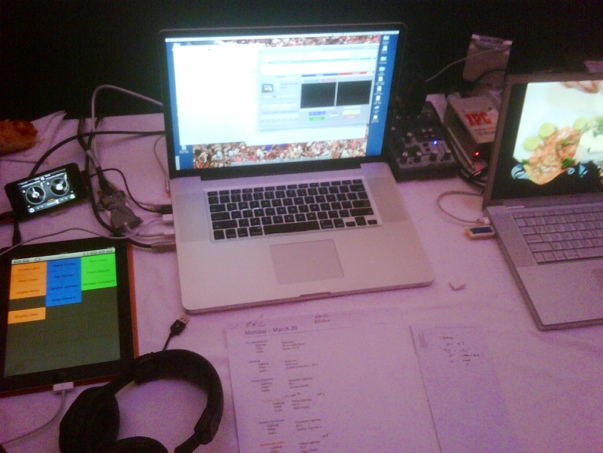
I have used the notes application extensively to, you know, take notes. Additionally, I’ve got many of the production apps I’ve normally used on my iPhone on the iPad now, so I have a second method for using some of these tools.
Currently I’m researching additional apps that will make having the iPad more productive for me, but I need to go through the process of weighing cost vs performance and need.
Overall I have quickly realized how much of a game changer this tablet is. I’m already starting to approach tasks and projects in a new way.
Posted from my iPad, of course.
Tags: apps, iPad, work
I have now been in Istanbul for nearly a week, and have been amazed at how warm and friendly the people are here. They are generous with their time, and proud to share their local cuisine and culture. When I travel for work I occasionally get out to see some of the city I am working in, but usually it’s after dark and I rarely get to do any of the touristy things like visit landmarks or museums. I do, however get out to a fair amount of restaurants and bars as the evenings are the only times I get a chance to leave the hotel.
One night our video & lighting techs took us to a local restaurant a few blocks from the hotel. This restaurant appeared to be small without any room for us, but we followed our hosts into the back of the restaurant and up a flight of stairs to another floor of dining, which was full. We continued up another flight and another to find a table. I have since learned that this is common among many dining establishments here, where they expand upward. Entering them sometimes feels like using a parking garage.

Turkish appetizers
Once we found a seat our hosts ordered traditional turkish appetizers which we all shared.

Chee Kufta
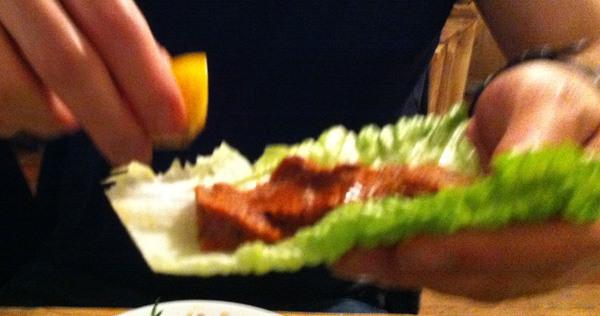
One of my hosts preparing some Chee Kufka for me
My favorite dish was Chee Kufta, which is spiced raw meat that is rolled into a lettuce leaf with a little fresh lemon. Very tasty and a bit spicy. The Chee Kufta at this restaurant was better then a dish I had later, so the taste does seem to vary.

Adana Kebab
My main dish was an Adana Kebab. I had one of these at my hotel my first night there, and I didn’t care for it much. I decided to try it again as I was truly in a locals place, and again found it not to my liking. I am not really sure what they spice this kebab with, but whenever I come across this flavor is a dish I find it more and more distasteful, rather than something I get more accustom to.

Ayran
To drink we had Ayran, which is water mixed with yogurt and a little salt added. It’s probably an acquired taste. It was ok, but too sour for my tastes, but I am glad I tried it. The copper cup, I think, added a flavor to the taste. I couldn’t say if that made it better or worse had I tried it in a glass.
After dinner we went down another block to a beer house where we met up with our video tech’s wife and a couple of her friends from her company. We spent a few hours drinking the local beer, Efes, and sharing stories. Afterwards we stopped at an outdoor cafe for some Turkish tea. It is very common to finish off an evening with a small glass of tea. Apparently you ca’t get this in a decaffeinated form, so I have not tried this. Despite being relatively cool and after 11pm, the cafe was quite crowded with people enjoying their tea. This may have been in part because there is no smoking allowed in most establishments, including the beer house where we were at, so many people where enjoying cigarettes with their tea.

Raki
A very popular local drink is Raki, a liquor with a strong licorice or anise flavor. I have found that I really enjoy this drink and intend to bring several bottles home from this trip.

A night out with the locals
Another evening we were invited to join some of the crew to go to a bar where one of their friends was celebrating a birthday. More of their friends gathered as the evening went on, and nearly all of them spoke english well, with many of them having lived for a year or more in the US at some point. All of them were friendly, always trying to include us in the conversation.
Overall I am really enjoying my time here in Istanbul. If all of Turkey is as open and friendly as they are here in Istanbul then America truly has a poor understanding of this country and the muslim people. I will not be heading for home for another five days, but I’m already looking forward to when I can return.

Tags: Ayran, Che Kufka, Istanbul, Raki, Turkey, Turkish Cuisine
I’m in Istanbul this week and next working on a meeting. This is my first trip to this city, and to Turkey. I wasn’t sure what to expect, but had pre-conceived notions that it would very Muslim influenced. To a certain extent that is true, but I find the city to be much more European in it’s feel. I imagine as you go further east in the country onto the Asian continent that the Muslim influence is stronger. I am in the part of Istanbul that is on the European continent but Istanbul is also part of Asia, making it the only city in the world to span across two continents.

But there are reminders of the Muslim heritage here. The skyline is dotted with mosques, including the famous Blue Mosque, which I can see from my hotel window (but not so well that I would include my own picture of it here). Morning prayers are broadcast across the city at 5am, and then at other times throughout the day, but because I am in the hotel ballroom most of the day I rarely hear it. Most people on the street are dressed fairly contemporary, but there is also a fair percentage of women wearing a hijab.
Security in the hotels is a little tighter than what you would experience elsewhere. Often cars need to stop before they pull up to the entrance, and a guard will scan the underside of the vehicle with a mirror and some kind of sensor. When walking into the hotel everyone walks through a metal detector alongside an X-ray machine for bags. This is a little daunting at first, but at the hotel I’m staying at they’re pretty relaxed about it. When people walk through the detector while talking on their cell phones security doesn’t seem to care.

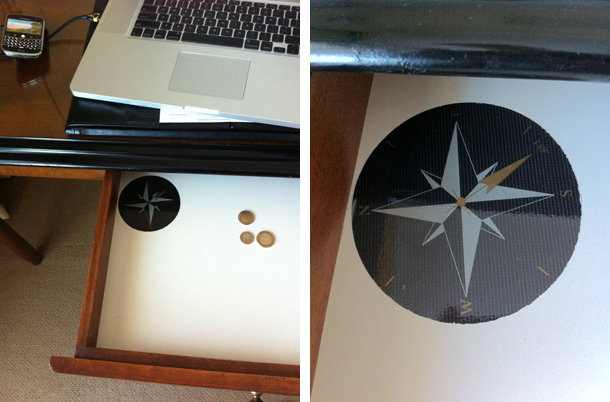
The hotel rooms are typical, but one difference is that there is a compass rose in the bottom of the desk drawer so people know which way north is when it’s time to pray.
An interesting bit of censorship on the television – all cigarettes, pipes, cigars, and other smokable things are blurred out. They were showing Quiz Show the other day, and the period piece had a lot of smoking, so a lot of blurred mouths and hands. Very amusing, since nearly everyone here smokes.
Tags: Istanbul, Turkey
When buying a smartphone, I know a lot of people who have chosen Android phones over the iPhone. The arguments for their choice were varied, and over the past year (since the availability of the iPhone on networks other than AT&T) there has only been one person who was able to give me what I considered to be a convincing reason for doing so (being a graphic designer, she wanted to be exposed to other design aesthetics).
Full disclosure here, I am an Apple fan (as if you didn’t know) and a stock holder. That being said, I’m not so ignorant as to not be able to recognize good technologies from companies other than Apple. I think Windows Phone is a really good and interesting mobile OS, and found it really well designed the couple of times I’ve had a chance to play with one. In fact, I find it superior to Android, and am perplexed at it’s lack of traction and can only chalk it up to their late start.
There are several reasons that I think the iPhone is a better purchase for people than Android phones. The number one reason is software. Not the number of Apps available – I find this argument disingenuous, as there were years in the 90’s when Windows users held up the number of apps available for their systems, and the counter argument was that while the Mac platform had less software available, it was generally of higher caliber. When I say software, I am referring to the Operating System; iOS for iPhone and Android (pick your favorite dessert) for android phones. My problem with Android is how slowly the newest OS from Google gets distributed to new or existing phones.
Yesterday Apple released an update to their iOS software for their mobile devices. Today, my 21 month old phone is running that software. I know of no Android phone, save the occasional Google Nexus, that gets this kind of quick software update. Late last year Michael Degusta wrote an article titled Android Orphans: Visualizing a Sad History of Support. He made a graph which demonstrated how far behind most Android phones are in running the most current operating system, if at all (Motorola seems to have a particularly bad track record). Some of his results:
• 7 of the 18 Android phones never ran a current version of the OS.
• 12 of 18 only ran a current version of the OS for a matter of weeks or less.
• 10 of 18 were at least two major versions behind well within their two year contract period.
• 11 of 18 stopped getting any support updates less than a year after release.
• 13 of 18 stopped getting any support updates before they even stopped selling the device or very shortly thereafter.
• 15 of 18 don’t run Gingerbread, which shipped in December 2010.
• In a few weeks, when Ice Cream Sandwich comes out, every device on here will be another major version behind.
• At least 16 of 18 will almost certainly never get Ice Cream Sandwich.
Let me reiterate: Yesterday Apple released an update to their iOS software for their mobile devices. Today, my 21 month old phone is running that software.
This week another blogger, Frasier Spears, wrote a great post that reflects many of my own feelings on Android. But his take on the disadvantages of being behind on one or more OS releases was something I hadn’t considered before:
The Android platform is currently stuck in second gear because Google, their OEMs and the carriers can’t, won’t or simply have no incentive to get the installed base past the Android 2.x API set. There are better and more powerful APIs in Android 4, and there will be better ones again in the future, but developers can’t take advantage of them because almost nobody is running the latest OS.
For example, Google recently shipped Chrome for Android which, by all accounts, is a pretty great mobile web browser. Unfortunately, it requires Android 4 and around 1% of the installed base is currently running that release.
This means that iOS apps are not only better than Android apps today, they’re getting better faster than Android apps because Apple is deploying, and the installed base is rapidly upgrading to, much more powerful APIs on the devices in consumers’ hands.
Another reason I hear people give for choosing Android over iPhone is they’re dislike of Apple’s requirement to vet every App before making it available in it’s App Store. I can understand where some people may have a philosophical issue with this, but really, unless you’re a developer, this should not have a significant impact on your smartphone experience. Again, Spears has a great point about this concerning the slow adoption of operating system upgrades:
There are problems with security on Android. Roughly speaking, they fall into the categories of security exploits and malware. Every platform has security exploits – heck, the very basis of iOS jailbreaking is finding security holes to exploit – but the incidence of malware is not evenly spread.
One of the claimed strengths of the Android platform is the ability to download software from anywhere and install it on your device. No gatekeeper! No walled garden! That’s a perfectly valid thing to aspire to.
I take the claimed importance of this at face value: if you want it, I assume you’re planning to actually use it. If you’re going to download and install apps from all over the web, you had better be sure that the base OS is bang up to date with security patches.
Another argument I have against Android phones is their monetary value. With so many Android phones being released on the market, each touting the next big improvement (3D! Bigger than your pocket!) they tend to lose their value faster than a new car being driven off the dealer lot. I bought my last iPhone in June of 2010, and for 16 months, it still had a list price of $199. Not so with Android phones. They may start at $199 when they hit the market, but their value soon plummets and you would be hard pressed to find anybody willing to pay you money for an Android phone that was a year or more old.
If your thing is buying new gadgets and trying out the latest technologies, than I suppose Android phones are fine, but if your making an investment in a smartphone that you intend to keep and use for a reasonable length of time, then, in my opinion, there’s only one option, the iPhone.
Tags: Android, Apple, iOS, iPhone
Apple is again preparing to update their desktop operating system, adding new features and functionality while also rethinking and changing the fundamental ways we interact with our computers.
I look forward to these software updates, as they often bring many great things to the Mac platform. One of my favorite new conventions is Natural Scrolling that was implemented with last year’s OS update. When I first heard about this I realized how much sense it made, especially with Apple’s two finger scrolling on their trackpads. Because I knew that I would eventually upgrade to the new OS and I wanted to get used to the new scrolling norm, I downloaded Scrollvetica, a small application that enabled natural (reverse) scrolling on my mac. While it took about a week before I didn’t have to think about which way I was scrolling and was naturally pushing the content in the direction I wanted it, I realized immediately that this was the proper way to do it. I believe Microsoft’s Windows 8 operating system will have Natural Scrolling built in as well, though I think it won’t be turned on by default, as it is in Apple’s OS, but will instead be an option the user can choose.
But other things Apple has been doing in their OS lately has bothered me. Natural Scrolling is part of their larger Gestures interface, which gives the user more control of their computer using multi-touch technology on their trackpads. I think Gestures are great, and have been using them for several years, but some of the ways it is implemented in the current OS are frustrating. Admittedly, some of my frustration has to do with the fact that some of the gestures I used for certain things changed, and I’ve found it hard to adjust to the new gesture as it seems less natural for me. But, I’m also pretty adept at adjusting to new things (I can use mouse, trackpad, or trackball equally well), so for me to find it difficult to adjust, I think, says something. Previously, in Apple’s Expose, the gesture to clear all windows off of the desktop was four fingers pushing up. When you did this, all of the windows would move up and away to either side of the screen. I equated this gesture with flicking the items out of my way. To bring the windows back, I pulled down with four fingers. To get to Widgets from the desktop the gesture was to pull down with four fingers, and then to dismiss them, four fingers up again.
Now the gesture of pushing four fingers up shrinks the desktop and pulls down a view of the desktop spaces, making the items on the screen move in the opposite direction of the gesture. Pulling down with four fingers reveals at the bottom of the screen all open windows for the active application. These gestures now seem less natural than the previous incarnation. Additionally, when the original gestures where first implemented, the commands they were controlling also had dedicated function keys on the keyboard that enacted the same behavior. Many of these keys have now been remapped to perform other functions meaning that a new user now needs to learn either the gesture or the new keystrokes (Command + Arrow) to be able to use these features. Judging by how many people I know who still don’t use keyboard shortcuts for such basic as Save, Quit, Copy and Paste, I suspect few people will be getting all of the benefits the Mac OS has to offer.
And this gets to, I think, a bigger problem for Apple. While I think gestures are cool and a great time saver, they aren’t completely obvious for a new user. Certainly you don’t need to know gestures to use a Mac, but without the dedicated keys you miss some of the functionality if you do not know the gestures. This is starting to happen with some of their other software as Apple is beginning to hide some basic functions and options making it difficult for a new user to acclimate to the OS, and possibly frustrating these new users.
 One example of this is in the sidebar windows of some Apple software, such as the Finder, iPhoto and iTunes. Older versions of the software had a triangle next to section headings in the sidebars that you could click to show or hide the contents under each heading. This is a convention that has been pretty standard across computer interfaces for years, and that Apple still uses to reveal nested contents when viewing folders in list mode.
The current versions of Apple’s software that uses a sidebar now has a hidden button to show or hide the contents of these section headings that the user has to discover.

As you can see in this picture above, on the left is what looks like an empty list of Playlists with no indication that there might be some content contained under that heading, and on the right, when the pointer is lined up with the section heading, the word ‘show’ appears. When the playlists are visible, the word ‘hide’ appears when the pointer is in line with the heading. I discovered this functionality quite by accident and after a brief moment of panic when it appeared that all of my playlists had disappeared.
Another new technology that Apple has rolled out is their iCloud. I think, in principal, that this is a great new feature. Right now I am using it to keep my address book synched between our home computer and our phones. Before iCloud, my wife and I were always trying to figure out which contact information for people was the most recent. Now when one of us updates someone’s information it syncs across all of our devices. Fantastic.
What I don’t like about iCloud is how it wants to treat music and photos. I may be in the minority here, but I don’t want my phone filling up with all of my music from iTunes, or music I’ve purchased. Additionally, since Apple’s free iCloud allotment is 5 GB, I don’t want or need that filled with music when I may want to use the space for other items.
Photo Stream is what Apple calls the feature of having your pictures sync across all of your devices. I think the idea of having photos I’ve taken move from my phone to my home computer through the cloud is great, but not every single picture I or my wife take. I tend to take many more photos than I’ll actually want to keep. Sometimes for fun, sometimes for work. Currently there’s no way to determine which photos get synched when using Photo Stream – they all go. I would prefer a system where I can pick which photos I want to have synched across all devices. I don’t think my wife is interested in having set construction photos on her phone when my intention is to load them on my work computer as part of a job record. Nor do I need every blurry photo my daughter takes showing up on my phone and filling my computer hard drive. Apple needs to make a way for us to choose which photos go to the cloud, and it should default to ‘none’ until we select otherwise.
Apple’s new iteration of Spaces is, for me, a less efficient implementation of what was once a great time saver. Spaces is what Apple calls their feature that allows you to have multiple desktops with one monitor, and uses gestures or keystrokes to switch between the Spaces. Generally I have one space where I use email, a web browser, spread sheet and word processor. My CAD program runs on another space, video editing in another, and iTunes and PhotoShop in a fourth space. This used to be very efficient for me as Apple arranged these spaces in a grid. I used a 2×2 grid for my four desktop spaces and I could get to any space with a single click, but you could set it up with more spaces, using 2×3 or 3×3, etc.
 Apple has now rolled Spaces into their Mission Control scheme, which includes Dashboard and Exposé, and now sets the desktop spaces out in a row. This means that if I’m working in space 1 and want to get to space 4 I have to click or swipe past two other spaces, and then the reverse to get back to where I was. I’m glad my work habit only involves four desktop spaces. Sure, there are other ways to switch between applications, or navigate the spaces, but the point here is that Apple took something that was simple and elegant and made it more cumbersome.
Another issue I have with the new Spaces is how it deals with the desktop icons and how it animates the moves. Previously the entire desktop slid away and was replaced with the next very quickly. Now the desktop slides away and when the new one slides into place there’s a moment where all of the desktop icons are missing before they fade up into place. This picture on the right shows a section of my desktop moving from one space to another. In this case I am moving one space to the right, and the left half of the picture shows the desktop I’m moving from. The right half shows part of the desktop space I’m moving to where you can see that there are no desktop icons visible – trust me, I have icons down the left side of my desktop.
Apple has added easing to this motion when moving from space to space, meaning that the new desktop no longer moves into place at a constant rate, but now the animation slows before the new desktop stops in its place. For some reason, while this sort of natural physics animation works in other places and makes things seem very natural, it doesn’t work for me here. I find it almost nauseating, especially when I am moving between spaces a lot (or, a lot of spaces).
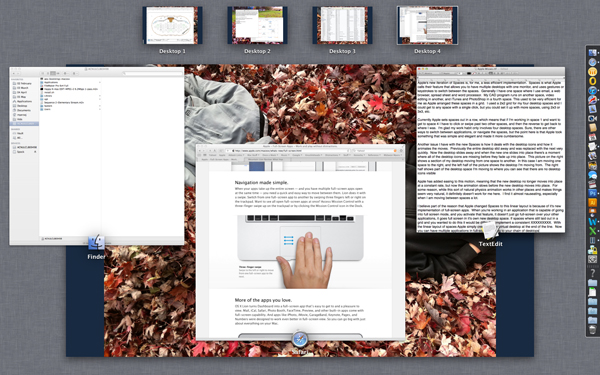
- Apple’s Mission Control with desktop Spaces at the top of the screen
I believe part of the reason that Apple changed Spaces to this linear layout is because of it’s new implementation of full-screen apps. When you’re working in an application that is capable of going into full screen mode, and you activate that feature, it doesn’t just go full-screen over your other applications, it goes full screen in it’s own new desktop space. If Spaces where still laid out in a grid and you wanted to do this it would be difficult to implement within a consistent convention. With the linear layout of spaces Apple simply creates a new virtual desktop at the end of the line. Now you can have multiple applications in full-screen, adding to your chain of desktops.
(Update: I’ve realized that the gesture to move from one desktop Space to another is probably another reason why Apple changed the way spaces are laid out.)
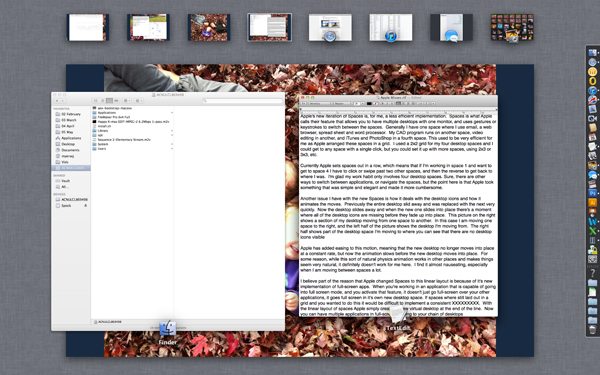
- That’s a lot of desktops from left to right
I’m indifferent to full-screen apps and don’t use this feature too much, but apparently there are issues with how full-screen apps are implemented if you use multiple monitors. I also question the wisdom of the full-screen option as our monitors continue to get bigger.
Most of this is the slow merger of Apple’s two operating systems, the iOS used on their iPhones and iPads, and the Mac OS X used on their traditional computers. I don’t think there is anything wrong with incorporating good ideas and conventions from one OS to the other, such as natural scrolling, but when the new conventions aren’t fully implemented or well thought out, it’s a detriment to what is otherwise an excellent user experience.
Tags: Apple, iCloud, Mission Control, Spaces








 ✧ ✧ MidWestMyers ✧ ✧
Apple Predictions
I stay away from Apple predictions, because I find that I’m usually wrong, but often surprised (in a good way) by the company, and I enjoy that.
Which makes this impending iPhone announcement a little less exciting for me as all of the leaked photos of the phone’s components have pretty much revealed most everything new about the phone. While we won’t know anything until they actually announce it, here’s what is expected:
This may also lend credence to the rumor that Apple will announce it’s new 7″ iPad at a separate event in October. This is not certain, but certainly seems likely. I was bit disappointed when I first heard speculation that the smaller, rumored iPad would not be announced at the same time as the new phone, because I like an Apple keynote that is full of goodies. But I understand the arguments, and it’s better now that that news is out of the bag instead of a boatload of investors driving the stock down after they’re disappointed that the smaller iPad isn’t announced along with the new phone. (Imagine the stock price if they announce it now anyway!)
The problem I have with a keynote devoted entirely to the iPhone is the repetition we’re sure to endure. If Apple stays true to their template of last year, once they get through updating their sales and share numbers (always fun), reveal the new phone and discuss the hardware, then we will move into the software. Last year this section of the keynote from Scott Forstall was almost identical to the software presentations he gave during the World Wide Developers Conference (WWDC) only a few months before. I am wondering if we will see the same thing at this year’s keynote to fill the time if they intend to focus primarily on the iPhone. I understand that the WWDC is aimed at developers, and that this iPhone keynote is aimed at consumers, but the reality is that most people and journalists who are going to watch this keynote online already geeked out to the WWDC iOS 6 keynote, so they will be covering old ground here.
Other items in the rumor mill for imminent announcements over the next couple of months are new iMacs, which might be entirely possible, a new retina MacBook Air, which I doubt as the current model is still too new, and I’m not sure the battery is there yet to support the processing needed to drive all of the additional pixels. New iPods are a possibility, and the 7″ iPad seems almost assured, although it seems we will have to wait until October for that.
Since I have veered into the prediction arena a bit here, I do have one prediction for the new iPhone which I have not seen anybody else write about. I predict the new iPhone will support faster syncing over USB 3.
Alright, that’s all I’ve got.
Posted by larvamoose on September 5, 2012 in Comments, Computer
Tags: Apple, iPad, iPhone