While recently in Spain, the hotel where we were staying had terrible internet. Most of the problem, I think, was due to it’s provider as opposed to the hotel’s wireless network, as I always had strong signal. The issues were with the log in page and the pass codes.
This network seemed to be PC centric, so tended not to play well with those of us on Macs during this trip. The first issue was that Apple’s Safari browser would crash on start up while trying to connect to the network. I was able to use Safari after connecting using Firefox or Chrome, but it was still iffy. The network also wreaked havoc on my iPhone, cuasing some software to crash repeatedly until I turned off the wifi. Never had that happen before.
Anyway, the point here is that while using Firefox and (for a while) unable to start Safari I wanted to import my bookmarks. So I went to the Firefox help menu and attempted to follow the directions provided for importing. The screenshot below shows how far I got.
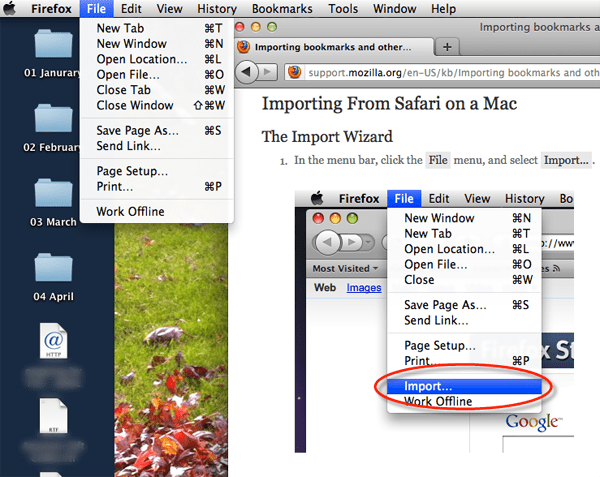
On the right is the Firefox browser showing the instructions for importing items. Their help document even circles the menu item I’m looking for (in case the blue highlight wasn’t enough). So I go to the menu displayed in their image, and in the Firefox drop down menu on the left you can see that this option does not exist. I did eventually discover how to import my bookmarks on my own, but suffice it to say that it was well hidden. Had the above document been correct, it may have earned the name “Help Document”.

 ✧ ✧ MidWestMyers ✧ ✧
Fail
While recently in Spain, the hotel where we were staying had terrible internet. Most of the problem, I think, was due to it’s provider as opposed to the hotel’s wireless network, as I always had strong signal. The issues were with the log in page and the pass codes.
This network seemed to be PC centric, so tended not to play well with those of us on Macs during this trip. The first issue was that Apple’s Safari browser would crash on start up while trying to connect to the network. I was able to use Safari after connecting using Firefox or Chrome, but it was still iffy. The network also wreaked havoc on my iPhone, cuasing some software to crash repeatedly until I turned off the wifi. Never had that happen before.
Anyway, the point here is that while using Firefox and (for a while) unable to start Safari I wanted to import my bookmarks. So I went to the Firefox help menu and attempted to follow the directions provided for importing. The screenshot below shows how far I got.
On the right is the Firefox browser showing the instructions for importing items. Their help document even circles the menu item I’m looking for (in case the blue highlight wasn’t enough). So I go to the menu displayed in their image, and in the Firefox drop down menu on the left you can see that this option does not exist. I did eventually discover how to import my bookmarks on my own, but suffice it to say that it was well hidden. Had the above document been correct, it may have earned the name “Help Document”.
Related
Posted by larvamoose on January 26, 2012 in Comments, Computer
Tags: Browser, Firefox, Help, Software