Tubing
 Yesterday I took the boys north a little ways to meet up with their cousins and do some snow tubing at a small ski hill. The weather was near perfect, the lines and crowd surprisingly small, and hill fast and fun. I didn’t take a lot of pictures, but the ones I did take are over on the Photos Page.
We also took along my younger son’s little video recorder which he can mount to his bike helmet. While I did have the foresight to charge his camera, I forgot to clear off the memory of the other videos he had taken, so the camera was nearly full before we even started. Here is the one short clip we managed to get before the memory filled.
Genius
Being hypoglycemic, I’m always on the look out for foods without excessive sugar. The cereal aisle at the grocery store is always a challenge, as most breakfast cereals are loaded with sugar. The good news is that over the years there have been many more “organic” cereals coming on the market which are sweetened with more complex sugars rather than corn syrup. The bad news is that these are often more expensive then regular cereal.
 Recently I discovered that Fiber One is sweetened with Aspartame, so I decided to give it a try. What I discovered, besides a reasonably priced, good tasting cereal that doesn’t upset my blood sugar, is a genius idea in packaging. Instead of putting the cereal into one big bag, they’ve divided it into two packages within the box. I don’t eat cereal every day, but when I’m in the mood for some I want it not to be stale. This solves that problem simply. While some may consider this excessive packaging, I’ve seen worse.
This packaging may just be necessary because the cereal is more prone to going stale than others, or absorbing moisture out of the air. I don’t know, but I can’t think of any good reason why other cereals, especially the jumbo boxes, couldn’t be packaged this way.
UPDATE – The antithesis of excessive packaging.
reCAPTCHA
If you know what reCAPTCHA is, good for you. If you don’t know what it is, you’re probably mistaken and you do know what it is, you just didn’t know what it was called. Here are some examples of a CAPTCHA.

That’s right, it’s those crazy letters you’re asked to verify when making some sort of on-line transaction at some web sites so they can ensure that your not just some computer bot clicking links.
In more recent time we’ve been seeing the reCAPTCHA, which is the newer version of the CAPTCHA that uses two words for you to verify.

Now, I too didn’t know these had a name, never really thought about it, really. Just saw it for what it was on the surface, a method of verification.
Turns out there is more going on with the reCAPTCHA than meets the eye. I can’t explain it any better than one of the inventors, Luis von Ahn, does in this video. I know, it’s over 17 minutes long, but do yourself the favor of watching until at least the 5:30 mark.
Warning – your life my seem less significant after viewing this.
Thanks to Teri for sending this to me.
Toothless
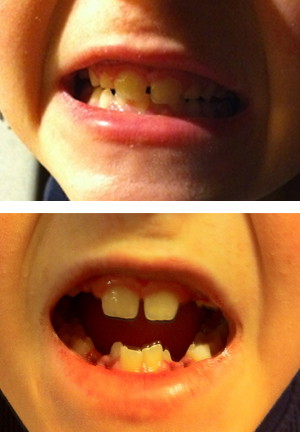 Yesterday our younger son had eight teeth pulled. This is because he will be ten years old in a month and he has lost a total of 4 teeth so far. You can see in the pictures the permanent teeth that have already grown in behind where the baby teeth were. He had taken to calling himself shark boy for a little while.
This kid has been a real trooper about this. Most kids, and adults for that matter, would have been very nervous about the whole ordeal, but he told us the other day that he couldn’t do anything about it, so he wasn’t really worried. When he returned from the dentist he looked a little worn and out of it, but he was still pretty numbed up. He was drooling and bleeding for some time, but didn’t complain at all. He was doing pretty well by dinner time, downing three bowls of soup and a milkshake, and was excited about being able to go to school today, even though we have given him the option to stay home. My wife and I again marveled at how quickly kids bounce back.
Before the procedure the dentist had predicted that the teeth would probably come out fairly easily as the roots of most baby teeth tend to dissolve as the permanent teeth push up from below. This turned out not to be the case.

His dentist called last night to check on how he was doing, which was very nice of her. She commented that she does about five of these multi-extractions a week, but this was by far one of the more difficult extractions she’s had to do. We suspect that with the permanent teeth already grown in behind these baby teeth that it was difficult to see these roots in the x-rays.
Needless to say, the tooth fairy was very generous the boy last night.
Craft
Last night on the Grammy’s Dave Grohl talked about how and why they made their current album the old fashioned way
…rather than use all the fanciest computers you can buy, we made this one in my garage with some microphones and a tape machine…
The human element of making music is what’s most important. Singing into a microphone and learning to play an instrument and learning to do your craft, that’s the most important thing for people to do.
I love that he used the word “craft” to describe making music. This is truly one of the last remaining widespread crafts that people do. Glassblowers, smithies, weavers – there are still people practicing these crafts, but they’re not nearly as widespread a practice as they used to be, because it isn’t as necessary with the technology that now exists.
Technology is now a huge part of the music industry, and it’s not all bad. The problem is when the technology becomes a crutch. As more music is created electronically, and more vocal performances are processed to the edge of recognition, the true musical performance becomes less important, and the spectacle takes over.
This is always brought starkly to the forefront when a band or performer is caught lip-syncing on SNL or some other show. I guarantee that Frank Zappa played everything live when he performed on SNL.
Not that I’m opposed to spectacle (Roger Waters’ The Wall is quite the spectacle, as are most U2 shows), but I expect some substance and craftsmanship when I see an “artist” perform.
What Can Your Phone Do For You?
It is truly amazing how far cell phones have come in such a short period of time. Smartphones are really less phones and more of a true pocket computer with communication abilities built in.
Take, for example, this information about a new album by the band One Like Son
Start the Show was recorded on the iPhone 3GS using GuitarJack, AmpKit and the AmpKit LiNK, FourTrack, Multitrack DAW, Pocket Organ, ThumbJam, the Moog Filtatron and GarageBand. Drums by DrumCore
Recorded on a phone, and not a new phone, a phone that is now 2 1/2 years old. Amazing.
Apple Hardware
If you use an Apple computer, you know there are certain things about how they build their computers that make them a joy to use. For me it’s the attention to details that other computer manufacturers don’t consider, or just get wrong. I want to mention two of my favorite hardware features on Apple’s MacBook computers here.
Six years ago Apple introduced a new type of connector for their laptop power supplies called a MagSafe connector. This connector uses magnets to attach itself the the laptop instead of the typical plug-in style. One of the advantages that Apple touted was it’s ability to disconnect from the laptop should somebody trip over the cord, hence preventing the computer from being pulled off a table and potentially a costly repair.
 I have to say, I did not find this hazard to be an issue for me, though since this style of connector was introduced I have had an instance where my power cord got tangled in somebodies bag and the connector was harmlessly yanked from the laptop when they picked their bag up to go.
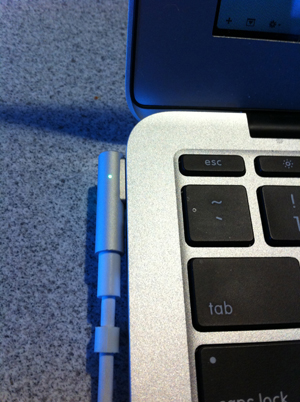 What I most enjoy about this connector is how it automatically attaches itself to the laptop. All you need to do is move it close to the port and the magnets suck it into place. Another great feature about this connector, but which is not new to Apple power supplies, is the LED light built into the connector. When the connector is attached to the laptop the LED will glow orange while the battery is charging, or green when the battery is fully charged. This is very helpful before I travel as I can tell whether I have a full charge or not without having to open the lid of my laptop. The light on the MagSafe connector is also a reliable why to tell if the connector is seated properly and actually charging. If there’s no light, there’s no charge.
I’ve seen other PC manufacturers’ connectors that light up, but they light up regardless of whether it’s plugged securely into the laptop or not, and they certainly don’t indicate whether the battery is charging or fully charged.
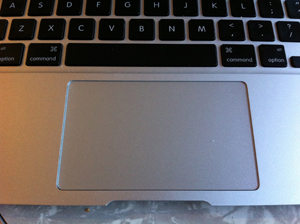 My other favorite hardware feature on an Apple laptop is the trackpad. This is, hands down, the single best feature that separates a Mac from the PC’s. I’ve been using Apple laptops since I got a PowerBook 1400cs in 1996, and have always found the trackpads to be superior. I used my PowerBook and it’s trackpad on a daily basis without issue. Sometime in 1997 I was asked to build a Powerpoint presentation on a presenter’s new Compaq laptop. After about three hours of work my hand was completely cramped up from using the trackpad on the PC laptop. This has never happened to me on an Apple laptop.
Since then I’ve owned five different Apple laptops (the 1400, a G3 Wallstreet, a 12″ G4, and now a 17″ MacBook Pro and an 11″ MacBook Air) and have found the trackpad to be superior on every one. For a couple of years (2007-’08) I had a Dell laptop supplied by my employer, and while the trackpad on that laptop was better than my past experience, it still didn’t come close to Apple’s trackpad.
Apparently I’m not the only one who has experienced this, as Joanna Stern at The Verge recently pointed out in a review:
“The truth is that no Windows laptop manufacturer has come close to matching the fluidity of Apple’s trackpads.
What every other PC maker has failed at, Apple nails: the touchpad on the Air works better with Windows 7 than any other Windows laptop on the market. Everything works as it should with Windows; navigating with two fingers on the pad is smooth with no jumping cursors, two-finger scrolling is smoother than anything I’ve seen on any other Windows 7 laptop, and palm rejection is top notch.”
This matches my experience exactly. But it’s not just that PC manufacturers aren’t making a trackpad as good as Apple’s, it seems as though some of them are purposely making the trackpad more difficult to use.
My sister-in-law bought a new laptop in the past year, and when she brought it by the house I was dismayed to see this:

That’s a textured surface on that touchpad, which some manufacturers are touting as a “feature.” I call it a fatal flaw. And it’s not just one manufacturer doing this, Sony & HP are guilty of doing this as well.


Granted, some of these aren’t new models, but it is apparently a trend that has been going on for a number of years. I recently came across this article buy Cyril Kowalski of The Tech Report which reflects my feelings exactly.
“…PC touchpads still suck almost universally by comparison.
It’s not just that PC laptop makers cut corners by using smaller touchpads with fewer features. It’s that some of them seem to be actively trying to make the user experience as miserable as possible, coating their touchpads with all manners of textured and glossy finishes that feel either awkward or plainly unusable.”
It just baffles me how such an important part of the computing experience is so undervalued by some of these manufacturers. It’s as if they never use their own products to discover what does and does not work well.
Alright, I’ve said my piece here. Obviously I’m very happy to be a Mac user, and have been for years, but it’s not all good. I have some gripes about some of the latest software changes that Apple has been implementing, but I’ll address those at a later date.

 ✧ ✧ MidWestMyers ✧ ✧
Political Science
I will, occasionally, write about my political point of view, but I try to stay away from inflammatory political rhetoric – after all, everyone is entitled to their own opinion. I like to think of myself as a left leaning moderate, though I find the current state of affairs paints me as more of a solid liberal.
This is never more true than when the topic of science comes up. The ability of the GOP to attack, what I believe to be, solid, sound research and empirical evidence frustrates me to no end. Not because they’re good at it, which they are, but because of the potential consequences of their actions.
Global Warming is obviously a hot button topic, and the Right has slowly been adopting their argument from outright denial of the phenomenon to now using specific (i.e. cherry-picked) science to point out that the planet goes through some natural climate change on it’s own. This is actually not a bad thing, in the sense that they’re actually turning to science to support their view, unlike some other theory questioning. (Note – using the word ‘science’ doesn’t make it science)
But what is truly appalling is when the strategy is to deny all science, especially in the education process. Recently some documents from the Heartland Institute, a strong opponent of Global Warming, where leaked on line. One of these documents, titled 2012 Heartland Climate Strategy, has a paragraph about developing a “Global Warming Curriculum for K-12 Classrooms.” Here is what appalls me (emphasis mine):
Really? That’s your strategy? To intimidate teachers into not teaching? This is the strategy that is best for the future of America?
For the record, the Heartland Institute is claiming that some of these documents are forged, which may or may not be true, and I certainly have no way to verify the validity of these documents. But remember, for the record, this group worked with the tobacco companies in the 90’s to question the science linking smoking to health risks.
Posted by larvamoose on February 20, 2012 in Comments, Green
Tags: Global Warming, Heartland Institute, Science