If you use an Apple computer, you know there are certain things about how they build their computers that make them a joy to use. For me it’s the attention to details that other computer manufacturers don’t consider, or just get wrong. I want to mention two of my favorite hardware features on Apple’s MacBook computers here.
Six years ago Apple introduced a new type of connector for their laptop power supplies called a MagSafe connector. This connector uses magnets to attach itself the the laptop instead of the typical plug-in style. One of the advantages that Apple touted was it’s ability to disconnect from the laptop should somebody trip over the cord, hence preventing the computer from being pulled off a table and potentially a costly repair.
 I have to say, I did not find this hazard to be an issue for me, though since this style of connector was introduced I have had an instance where my power cord got tangled in somebodies bag and the connector was harmlessly yanked from the laptop when they picked their bag up to go.
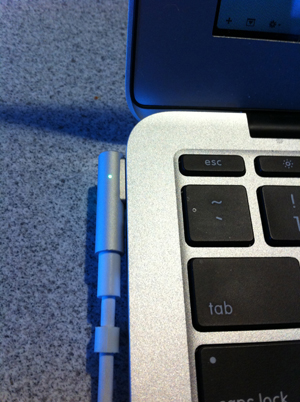 What I most enjoy about this connector is how it automatically attaches itself to the laptop. All you need to do is move it close to the port and the magnets suck it into place. Another great feature about this connector, but which is not new to Apple power supplies, is the LED light built into the connector. When the connector is attached to the laptop the LED will glow orange while the battery is charging, or green when the battery is fully charged. This is very helpful before I travel as I can tell whether I have a full charge or not without having to open the lid of my laptop. The light on the MagSafe connector is also a reliable why to tell if the connector is seated properly and actually charging. If there’s no light, there’s no charge.
I’ve seen other PC manufacturers’ connectors that light up, but they light up regardless of whether it’s plugged securely into the laptop or not, and they certainly don’t indicate whether the battery is charging or fully charged.
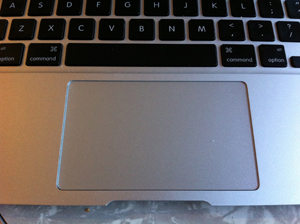 My other favorite hardware feature on an Apple laptop is the trackpad. This is, hands down, the single best feature that separates a Mac from the PC’s. I’ve been using Apple laptops since I got a PowerBook 1400cs in 1996, and have always found the trackpads to be superior. I used my PowerBook and it’s trackpad on a daily basis without issue. Sometime in 1997 I was asked to build a Powerpoint presentation on a presenter’s new Compaq laptop. After about three hours of work my hand was completely cramped up from using the trackpad on the PC laptop. This has never happened to me on an Apple laptop.
Since then I’ve owned five different Apple laptops (the 1400, a G3 Wallstreet, a 12″ G4, and now a 17″ MacBook Pro and an 11″ MacBook Air) and have found the trackpad to be superior on every one. For a couple of years (2007-’08) I had a Dell laptop supplied by my employer, and while the trackpad on that laptop was better than my past experience, it still didn’t come close to Apple’s trackpad.
Apparently I’m not the only one who has experienced this, as Joanna Stern at The Verge recently pointed out in a review:
“The truth is that no Windows laptop manufacturer has come close to matching the fluidity of Apple’s trackpads.
What every other PC maker has failed at, Apple nails: the touchpad on the Air works better with Windows 7 than any other Windows laptop on the market. Everything works as it should with Windows; navigating with two fingers on the pad is smooth with no jumping cursors, two-finger scrolling is smoother than anything I’ve seen on any other Windows 7 laptop, and palm rejection is top notch.”
This matches my experience exactly. But it’s not just that PC manufacturers aren’t making a trackpad as good as Apple’s, it seems as though some of them are purposely making the trackpad more difficult to use.
My sister-in-law bought a new laptop in the past year, and when she brought it by the house I was dismayed to see this:

That’s a textured surface on that touchpad, which some manufacturers are touting as a “feature.” I call it a fatal flaw. And it’s not just one manufacturer doing this, Sony & HP are guilty of doing this as well.


Granted, some of these aren’t new models, but it is apparently a trend that has been going on for a number of years. I recently came across this article buy Cyril Kowalski of The Tech Report which reflects my feelings exactly.
“…PC touchpads still suck almost universally by comparison.
It’s not just that PC laptop makers cut corners by using smaller touchpads with fewer features. It’s that some of them seem to be actively trying to make the user experience as miserable as possible, coating their touchpads with all manners of textured and glossy finishes that feel either awkward or plainly unusable.”
It just baffles me how such an important part of the computing experience is so undervalued by some of these manufacturers. It’s as if they never use their own products to discover what does and does not work well.
Alright, I’ve said my piece here. Obviously I’m very happy to be a Mac user, and have been for years, but it’s not all good. I have some gripes about some of the latest software changes that Apple has been implementing, but I’ll address those at a later date.
 ✧ ✧ MidWestMyers ✧ ✧